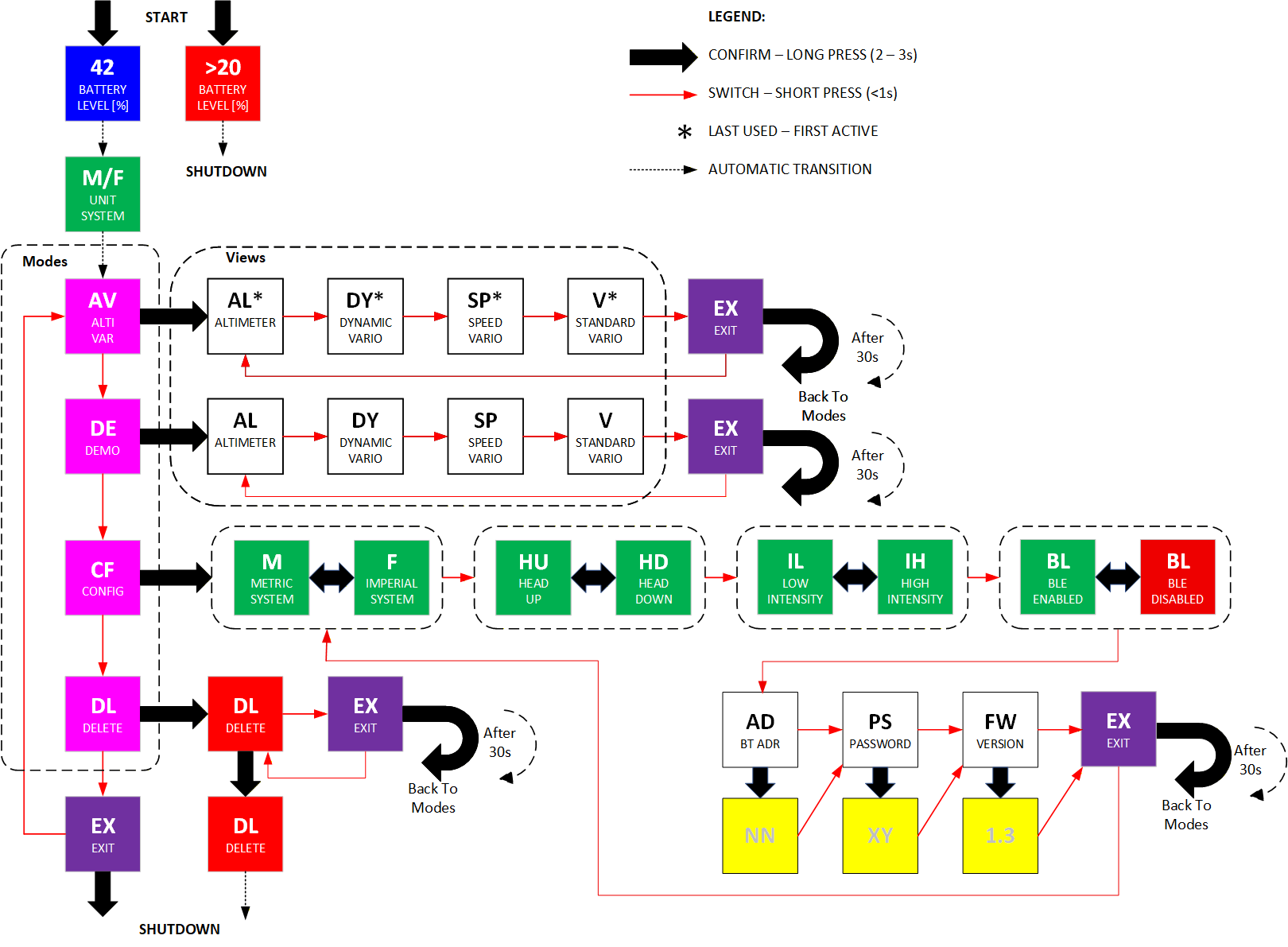
Figure 1 Menu Tree
2026
Version: 10.3.0
Get your 3EYE HUD up and running in minutes.
Hold the button until display becomes live (2s). If successful, 3EYE will show the battery status, metric or imperial configuration (m of f).
Hold button 2s (unit LED intensity increase) to step into the AltiVar (AV) mode.
⚠️WARNING If you do not enter any mode within 30s, the 3EYE will automatically shut down.
⚠️WARNING Start 3EYE ONLY ON GROUND LEVEL. You cannot start 3EYE during vertical activity.
NOTICE If the battery level is less then 20%, the device will not start.
Make sure 3EYE is on in AltiVar (AV) or Demo (DE) mode.
Press the button briefly to switch views.
Press the button briefly until exit code (EX) appears.
Hold the button for 2s until you exit from current mode.
Press the button briefly until configuration code (CF) appears.
Press the button briefly to toggle between settings (see configuration codes below).
Hold the button for 2s until the selected setting changes its value and the color turns red.
Release the button. The new setting will turn green and be saved to the flash memory.
3EYE sets the ground level when it starts. To reset ground level do: - turn 3EYE off and on or - use Link3EYE mobile app.
⚠️WARNING In Altimeter view, the ground level may not display a value of exactly 0 because 3EYE uses a highly sensitive sensor capable of detecting elevation differences as small as 1 meter, or even 1 foot.
Plug in a USB-C cable. It takes about 16 hours to fully charge. The display will show the battery charge percentage (blue) if device was not started.
⚠️WARNING If the battery level drops below 10%, 3EYE will shut down unless a vertical event is in progress. To start 3EYE, the battery level must be at least 20%.
⚠️WARNING 3EYE automatically stops after 14 hours.
| Mode | Code | Description |
|---|---|---|
| AltVar | AV | Main measuring mode |
| Demo | DE | Simulation mode |
| Configuration | CF | Adjust settings |
| Delete | DL | Delete all logs and set factory setting |
| Exit | EX | Exist from the mode of stop 3EYE |
| View | Code | Units |
|---|---|---|
| Skydive altimeter | AL | [m] or [ft] |
| Dynamic variometer | DY | [m/s] or [ft/s] |
| Speed dive variometer | SP | [km/h] or [mph] |
| Standard variometer | V | [m/s] or [ft/s] |
| Unit | Code | Description |
|---|---|---|
| Meter | M | [m] |
| Feet | F | [ft] |
| Meter per second | M.S | [m/s] |
| Feet per second | F.S | [ft/s] |
| Kilometer per hour | KH | [km/h] |
| Mile per hour | ML | [mph] |
| Configuration | Code | Description |
|---|---|---|
| Meter | M | SI units (m, m/s, km/h) |
| Feet | F | Imperial units (ft, ft/s, mph) |
| Head-up display | HU | Mirror image display |
| Head-down display | HD | Does not mirror image display |
| Low intensity | IL | Reduce display intensity |
| High intensity | IH | Set higher display intensity |
| BT enable | BL | Enable (green) or disable (red) Bluetooth |
| BT address | AD | Show Bluetooth address (name) |
| BT password | PS | Show Bluetooth password |
| Firmware version | FW | Show Firmware version |
Figure 1 Menu Tree
Need more detail? See the full 3EYE User Manual.
Homepage: https://www.3eye.blue